Address
304 North Cardinal St.
Dorchester Center, MA 02124
Work Hours
Monday to Friday: 7AM - 7PM
Weekend: 10AM - 5PM

Address
304 North Cardinal St.
Dorchester Center, MA 02124
Work Hours
Monday to Friday: 7AM - 7PM
Weekend: 10AM - 5PM
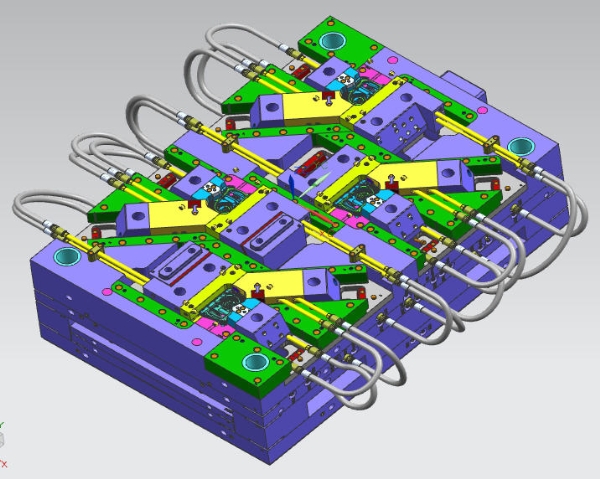
Understanding what information need for mold design separates projects that launch on time from those that bleed budget in revision cycles. For marketers coordinating product launches, packaging updates, or consumer goods projects in 2026, knowing exactly what data the mold designer needs is a competitive advantage—not just an engineering concern.
This article walks you through the seven critical data categories every mold design brief must contain. You will learn which inputs prevent costly tooling changes, how AI is reshaping the information-gathering process, and how to communicate specifications clearly to your manufacturing partners.
Mold designers need a complete brief before they can begin. Missing even one input category forces guesswork, which causes rework, delays, and extra cost. The core information categories are:
Each category is covered in detail below. Providing all seven upfront compresses the quoting timeline and reduces engineering change orders (ECOs) after tooling begins. For a broader overview of where to start, see Suggestions on Design Procedure.
Part geometry is the foundation of every mold design decision. The 3D CAD model defines cavity count, parting line placement, number of side actions, and overall tool size.
Supply a STEP or IGES file—not just a PDF drawing. Native CAD formats from SolidWorks, CATIA, or Creo are acceptable but check format compatibility with your tooling partner first. The mold designer uses this file to run mold-flow simulation, identify potential short shots, and confirm wall thickness consistency.
Key geometry inputs the designer analyzes:
In 2026, AI-assisted geometry analysis tools can flag design-for-manufacturability (DFM) issues within minutes of receiving a STEP file—dramatically shortening the pre-tool review cycle.
Material selection directly controls steel grade, cooling channel layout, and shrinkage compensation. Providing the resin type without the specific grade is not enough.
The mold designer needs:
The Society of Plastics Engineers (SPE) maintains technical resources on resin processing parameters and material standards that are useful when building your material brief., for example, require harder tool steels and different gate designs than unfilled resins. Providing a complete material datasheet at the start prevents steel selection errors that cannot be corrected without rebuilding the tool. Learn more about how material affects tooling in our guide to Mould Steel.
Tolerances determine machining cost and cycle time. Tight tolerances on non-functional surfaces inflate tooling cost without adding value.
Provide a drawing or annotated 3D model that distinguishes:
| Tolerance Type | Typical Range | Cost Impact |
|---|---|---|
| General (cosmetic) | ±0.2 mm | Low |
| Functional fit | ±0.05 mm | Medium |
| Critical/precision | ±0.01 mm | High |
Mark which dimensions are critical for assembly, which are appearance-driven, and which are non-functional. The mold designer will use this to prioritize machining sequences and determine whether EDM (electrical discharge machining) is needed for tight features.
Surface finish affects both aesthetics and part function. Specify finish using the SPI (Society of the Plastics Industry) grading system—or provide a physical reference sample. The Plastics Industry Association publishes the official SPI finish standards used across the US industry.
Common SPI grades:
If your product requires custom texturing (e.g., leather grain or geometric patterns), supply the texture file or Mold-Tech texture reference number. This information affects lead time because texture application is a separate process performed after steel polishing.
Annual production volume dictates tool steel grade, cavity count, and maintenance intervals. A mold designed for 10,000 parts per year uses different materials and construction standards than one running 1,000,000 parts per year.
Tool life targets translate directly to steel selection:
Provide your annual volume, expected product lifetime, and any planned volume ramp. Marketers who treat volume as an afterthought often end up with a tool that wears out before the product line matures. See our Injection Molding Cost guide to understand how volume drives total tooling spend.
Gate location controls where the plastic enters the cavity and determines where the weld line (knit line) appears on the finished part. Parting line placement affects which surfaces require polish and which show a visible seam. For a deep dive into gate placement strategy, see Gate Location and the Plastics Industry Association tooling guidelines.
Specify any areas where a gate mark or parting line is unacceptable—such as Class-A appearance surfaces, sealing surfaces, or areas that contact skin. The mold designer will then route the gate to a hidden location or design a submarine (tunnel) gate.
If you have no constraints, say so explicitly. Leaving this undefined forces the designer to make assumptions that may conflict with your product requirements.
Draft angles allow the part to release cleanly from the mold without drag marks or distortion. Provide minimum draft angles for each surface category.
General guidance (verify with your material supplier):
If your CAD model lacks draft, flag it explicitly. The mold designer may add draft during DFM review, but undisclosed zero-draft surfaces cause conflict and delay. Read our full reference on Draft and Hole Design for surface-specific angle guidelines.
Undercuts are features that prevent straight ejection from the mold. Each undercut requires a side action, lifter, or collapsible core—adding cost and complexity.
In your brief, identify:
AI-powered DFM tools in 2026 can automatically detect undercuts from a STEP file and propose side-action directions. Even so, confirming undercut intent (functional vs. accidental) still requires human review. See Undercuts for a detailed breakdown of undercut types and solutions, and Protolabs’ DFM design tips for practical real-world examples.
Cooling time accounts for roughly 60–70% of total injection molding cycle time. If your program has a cycle time target, state it. The mold designer will size cooling channels and plan baffles or bubblers accordingly.
Provide:
Conformal cooling can reduce cycle time by 20–40% compared to conventional drilled channels. It adds upfront tooling cost but reduces per-part cost at scale—a calculation that marketers tracking total landed cost should understand.
AI accelerates mold design information gathering in three concrete ways in 2026:
Platforms like Protolabs, Fictiv, and Xometry now embed AI-assisted DFM feedback directly into their quoting workflows. Marketers using these platforms receive manufacturability feedback before they even talk to a toolmaker. Autodesk’s Moldflow simulation tools offer another layer of validation for cooling and fill analysis before steel is cut.
| Information Category | Who Provides It | Impact If Missing | Priority |
|---|---|---|---|
| 3D CAD (STEP/IGES) | Design engineer | No quote possible | Critical |
| Material datasheet | Engineering / procurement | Wrong steel, shrinkage errors | Critical |
| Tolerances | Design engineer | Over-engineered cost or scrap | High |
| Surface finish grade | Industrial designer / marketing | Wrong polishing, rework | High |
| Annual volume | Marketing / product manager | Wrong tool life, steel grade | High |
| Gate / parting constraints | Marketing + engineering | Visible defects on Class-A | Medium |
| Draft angles | Design engineer | Drag marks, part sticking | Medium |
| Cooling / cycle time | Engineering / operations | Missed cost targets | Medium |
Marketers own the product requirements but often hand off incomplete briefs. The most common gaps:
What file format should I send for mold design? STEP (.stp) is the most universally accepted format for mold design. IGES is also widely supported. If you only have a native CAD file (SolidWorks, CATIA), confirm compatibility with your tooling partner before sending. PDF drawings alone are never sufficient for mold design.
Can I start mold design without a final material selection? In most cases, no. Shrinkage rate, processing temperature, and steel grade all depend on the material. Some toolmakers will begin steel procurement with a provisional material spec, but finalizing the design requires confirmed material data. Changing material after tooling begins often requires cavity rework.
How long does mold design take once all information is provided? Mold design for a simple single-cavity tool typically takes two to four weeks. Complex multi-cavity tools or tools with many side actions can take six to twelve weeks. Providing complete information at the start prevents design holds that extend these timelines.
What happens if I don’t specify gate location? The mold designer will choose the gate location based on fill analysis. This is technically sound but may result in a gate mark or weld line in an unacceptable location. Marketers should always flag appearance constraints, even if they leave the specific gate decision to the engineer.
Do I need to specify cooling requirements? If you have a cycle time target or a unit cost target that depends on throughput, yes. Otherwise, the mold designer will optimize cooling based on standard practice. Sharing your cost-per-part targets helps the designer make better trade-offs between tooling investment and cycle time.
How is AI being used in mold design information collection in 2026? AI tools now automate DFM feedback, flag missing specification fields in design briefs, and recommend materials based on application requirements. Several online manufacturing platforms integrate AI-driven intake forms that prompt users for every required data point before routing the request to a toolmaker—reducing back-and-forth by a significant margin.
Knowing what information need for mold design is not just an engineering responsibility—it is a product launch competency. Marketers who provide complete, structured briefs compress timelines, reduce ECOs, and protect Class-A surface quality. In 2026, AI-powered DFM tools and digital manufacturing platforms make it easier than ever to gather and validate this information early. The seven categories—geometry, material, tolerances, surface finish, volume, gate constraints, and draft—form the non-negotiable foundation of every successful mold program. Master them, and you move faster than competitors who treat tooling as a black box.
Internal resources:
External resources:

